[ Communications ]
Account Notification Messaging Terms
- Effective
- August 6, 2026
- Version
- 2026-08-06
This page governs the Account Notifications program. This program is operated directly by Syntax Voice to send transactional account and service alerts to our own account holders.
If you received a message from a business using our software to route their calls, you are looking for our Platform Messaging Safeguards instead.
01 / Program Description
When opted in, Syntax Voice will send you transactional SMS alerts regarding your workspace. Depending on your dashboard toggles, these may include:
- Urgent and emergency callback alerts.
- Plan-usage warnings and billing notices.
- Per-call summaries and daily recaps.
02 / How You Opt In
There is exactly one way to join this program, and it happens inside your own account while you are signed in:
- Open Settings in the Syntax Voice dashboard and select the Alerts tab.
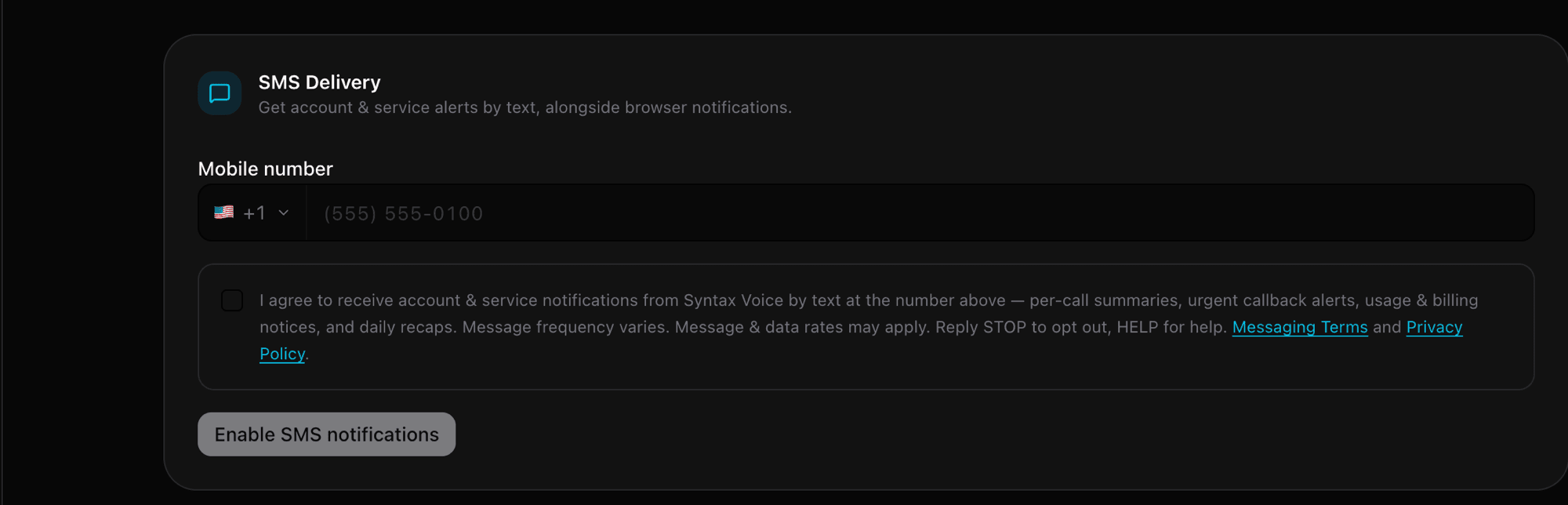
- In the SMS Delivery card, type the mobile number you want notifications sent to. This field does not automatically inherit your profile phone number or business line.
- Tick the consent box, which states:
[ The consent wording, verbatim. Version 2026-07-15 ]
“I agree to receive account & service notifications from Syntax Voice by text at the number above — per-call summaries, urgent callback alerts, usage & billing notices, and daily recaps. Message frequency varies. Message & data rates may apply. Reply STOP to opt out, HELP for help. Messaging Terms and Privacy Policy.”
- Press Enable SMS notifications. This button remains disabled until both a valid mobile number and the ticked box are present.
Consent is not a condition of service. Consent to receive these text messages is never a condition of opening a Syntax Voice account or keeping one. You can decline at signup, enroll later, or disable them at any time without losing platform functionality.
03 / How to Opt Out or Get Help
- To opt out. Reply STOP, QUIT, END, CANCEL, or UNSUBSCRIBE to any message you receive from us. You can also instantly disable texts by clicking the “Turn off SMS” button in your dashboard under Settings → Alerts.
- To get help. Reply HELP or INFO to any message for support instructions, or email us at hello@syntaxvoice.com.
04 / Delivery, Rates, and Privacy
- Rates and frequency. Message frequency varies based on your account activity and the specific alert toggles you have enabled. Message and data rates may apply through your mobile carrier.
- Delivery limitations. Mobile carriers are not liable for delayed or undelivered messages.
- Privacy guarantee. We process your mobile number and opt-in data strictly to deliver this service. We do not share, sell, or provide your mobile phone number or opt-in data to any third parties or affiliates for marketing or promotional purposes. For full details, please review our Privacy Policy.